 RoboPioneer
Designing a voice interface around an expressive character
Make listening, speaking and message control clear while giving the character a distinct personality.
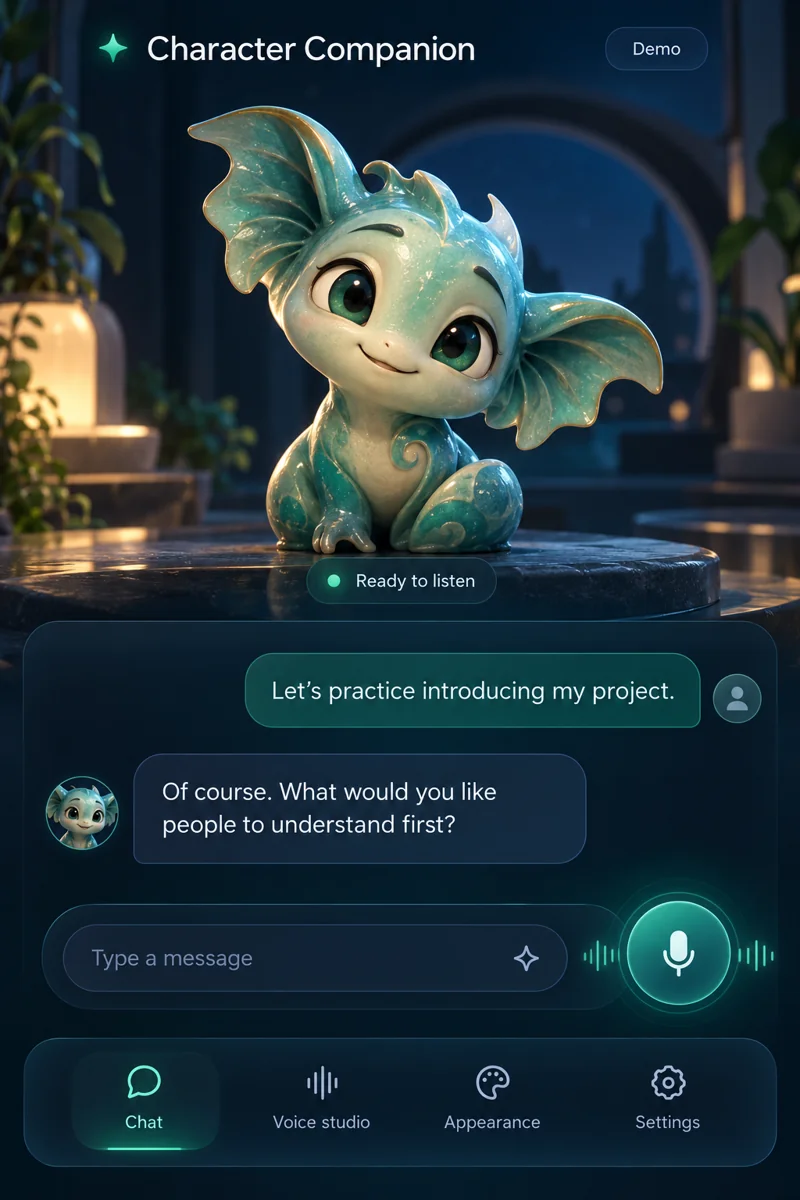
Make the conversation state visible
A person should be able to tell whether the app is listening, processing or speaking. Use a clear control and a consistent visual state rather than relying only on animation. Character Companion explores voice conversation alongside an expressive character, making the relationship between interaction and presentation central to the experience.
Keep text available alongside voice
A transcript or message history helps people review what they said and return to an earlier point. Provide a clear way to type when speaking is inconvenient. Voice and text serve different situations, so switching between them should preserve the conversation context.
Give expression a purpose
Gestures and facial changes can make a character feel responsive, but they should support the interaction. Match the visual reaction to the current state and avoid constant movement that competes with reading. A small, understandable set of expressions can be easier to follow than animation that changes without a clear reason.
Let people control the experience
Voice, appearance and interaction preferences affect how comfortable the app feels. Keep the controls easy to find and make changes understandable. Test the experience in short real-world sessions: a quick typed message, a spoken exchange and a return to an earlier conversation. These reveal different needs than a continuous demo.